

Frequently asked questions
Short answers about Exegol Workstation (images, wrapper, resources). For a broken install or a failing command, see Troubleshooting. For in-container shortcuts, see Tips & tricks.
MCP, Sentinel and Dashboard have their own docs.
Plans
What is the difference between Community, Pro, Team and Enterprise?
The comparison (images, commercial use, seats, support) is on exegol.com/pricing with a detailed comparison at exegol.com/pricing/comparison. Badges on each page mark which tier a feature requires.
What is the difference between shell logging and Sentinel?
They are independent and can be used together.
- Shell logging (
--log) is a session recorder: the terminal stream (stdin, stdout, stderr) into/workspace/logs. - Exegol Sentinel is a structured audit record per finished command, written on the host for a person or a SIEM.
What is a container profile?
A container profile is a named set of container-shape defaults (image, shell, network, mounts, capabilities, …) in a YAML file whose file name is the profile name. It is applied at container creation only, with the command line winning over the profile. Select it with exegol start --profile <name>. Professional licence or above.
What is the difference between a container profile and a Sentinel profile?
- A container profile describes how a container is built. Professional or above.
- A Sentinel profile describes what the command journal records and which extra evidence to collect. It does not change the container's shape.
They meet in one place: a container profile may carry a sentinel section that turns audit logging on and names which Sentinel profile to use.
Platform
Can I run Exegol on a macOS?
Yes. Intel (AMD64) and Apple Silicon (ARM64) are both supported.
Can I install docker directly on my WSL2 distro instead of Docker Desktop ?
Yes, but you are then restricted to that WSL2 environment. Docker Desktop is the officially supported setup on Windows (Exegol from PowerShell/cmd, Windows folder sharing).
How to install Exegol on an external drive?
The wrapper is small; images are not. This is “where does Docker store data?”, and it depends on the host.
On macOS and Windows, set it in Docker Desktop: Settings > Resources > Advanced > Disk image location.
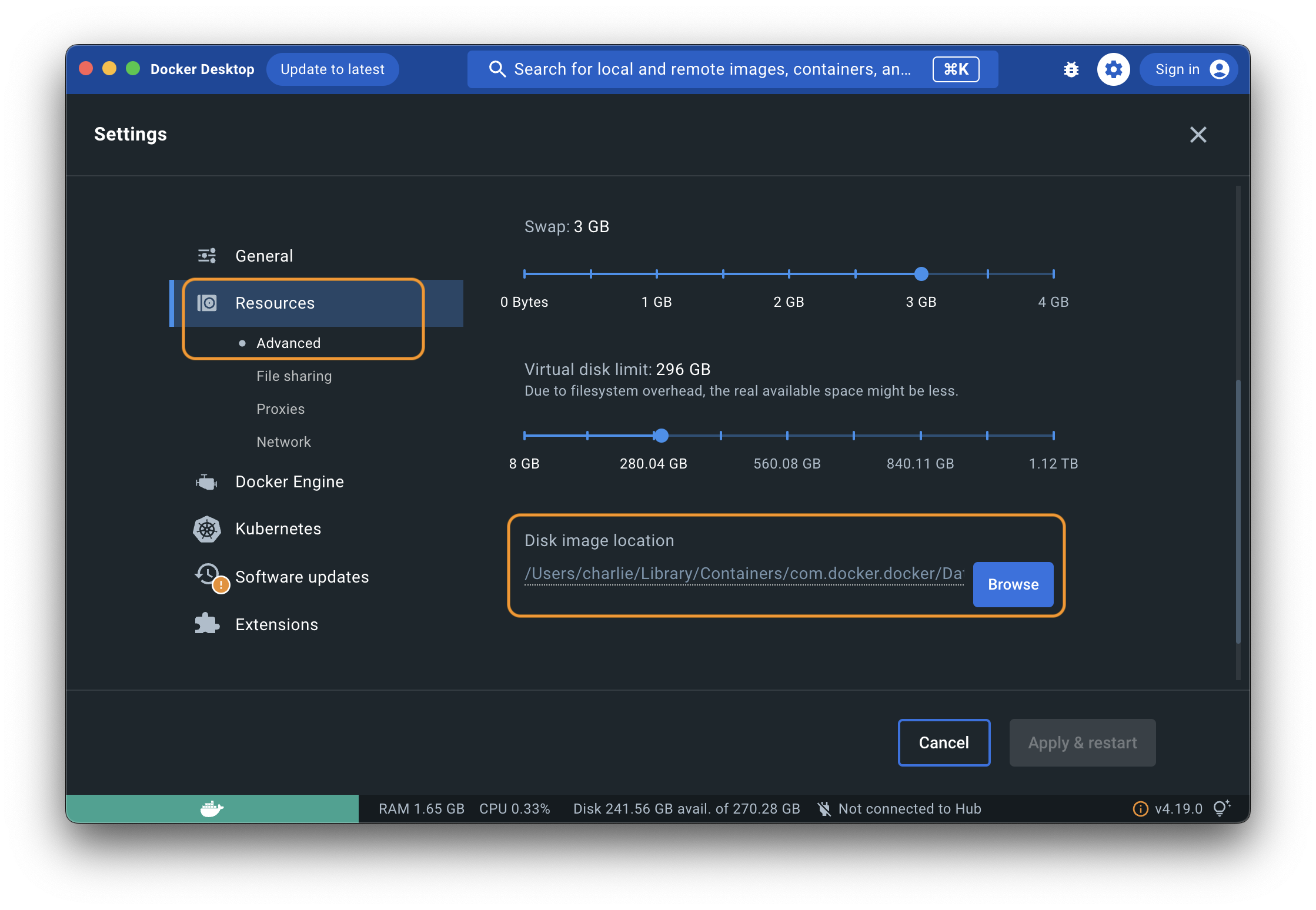
If the virtual disk is full while the physical disk is not, that is a different issue, see Disk space.
WSL 2 consumes massive amounts of RAM, CPU power, and disk space. How can I deal with this issue?
See Troubleshooting.
Using a container
What tools are installed in Exegol?
The list is generated per image, per version: Tools list.
Can I use a VPN with Exegol?
Yes. Use --vpn at container creation. See start.
exegol start <container_name> <image_name> --vpn <myconf.ovpn>How to retrieve your desktop login details ?
exegol info <container> prints the container's root password. Needed for the desktop feature.
How do I update Exegol?
exegol update will update all sorts of things except the wrapper itself.
Update the wrapper with: pipx upgrade exegol. If you've installed the wrapper differently and can't find out a way to update it, open a support ticket (you'll need a Pro license, or above).
Customizing
Can I customize Exegol?
- In-container customisation at creation: my-resources
- Wrapper / Container configs: user config and container profiles
- Your own image: below
Can I make my own Exegol image?
Create a dockerfile (e.g. CUSTOM.dockerfile) at the root of the exegol-images module, next to the other dockerfiles (/path/to/Exegol/exegol-docker-build/). Then build it:
exegol build "myimagename" "CUSTOM"How to add a new tool?
Depends.
- Official images: image contribution guidance
- Your own local image: same guidance, then
exegol installlocally (no PR) - One live container: install it in that container
- Every new container automatically: my-resources